







How to Implement Microsoft Dynamics 365 Successfully: Urewa’s Practical Delivery Approach
A technically correct implementation can still fail to deliver value — if users are not prepared, data is unreliable, integrations are unstable, or the organisation simply recreates its inefficient legacy processes inside a new ERP.
- Implementation
- Urewa Editorial
- Practical guide
- 16 min read
- 2026
Contents
Implementing Microsoft Dynamics 365 is not a software deployment. It is a business transformation involving processes, people, data, integrations, controls, reporting and change management. Which is why a successful implementation starts with one principle:
Start with the business problem, not the software screen.
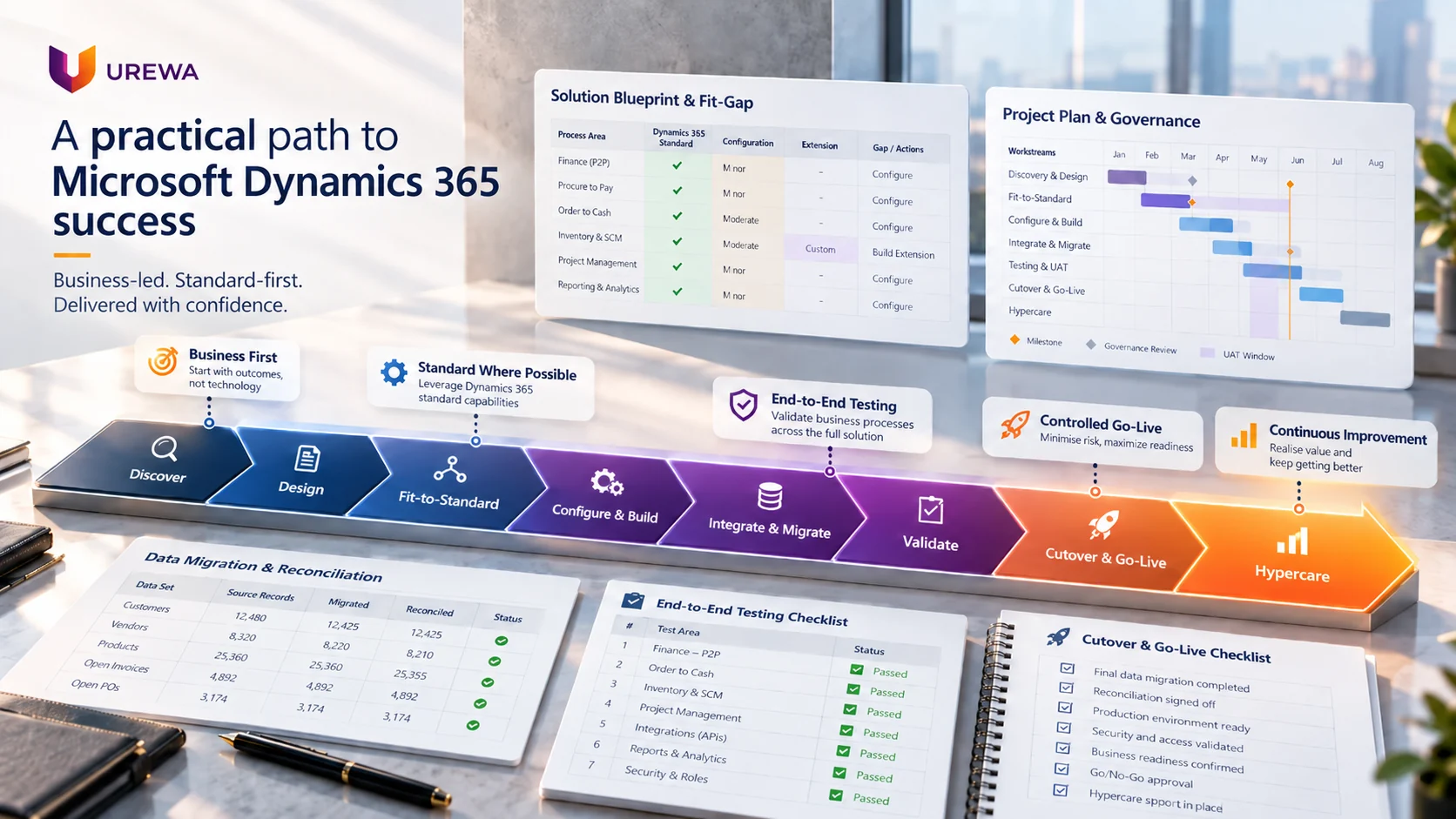
Our approach is built around understanding how the organisation works today, defining how it should work in future, using standard Dynamics 365 capability wherever practical, and controlling the transition from design through go-live and stabilisation. In one line: business first, standard where possible, extend where justified, test end to end, go live with control, improve continuously.
If you are looking for the service itself rather than the method, our Dynamics 365 implementation services page covers engagement types, deliverables and what we need from you.
01The PatternWhy Dynamics 365 implementations succeed or fail
Dynamics 365 provides capable functionality across finance, supply chain, sales, service, projects, reporting, Power Platform and integration. Technology alone does not guarantee success. Implementation problems reliably begin in the same places:
- Configuration starts before the processes are understood
- Poor-quality data is migrated rather than cleaned
- Every legacy customisation is recreated by default
- Integrations are underestimated until late in the build
- Individual screens are tested instead of complete processes
- Business users are involved too late to influence the design
- Scope expands without a control mechanism
- Go-live is treated as an IT event rather than a business transition
None of these is a software defect. Every one is a delivery decision — which is good news, because delivery decisions are controllable.
02Eight StagesUrewa's Dynamics 365 implementation framework
We structure implementations around eight connected stages:
Discover → Design → Configure & Build → Integrate & Migrate → Validate → Prepare → Go Live → Stabilise
Each stage has a different purpose, but they run as one programme rather than a relay. The integration design affects the migration plan; the migration cycles affect the test plan; the test results affect the go/no-go decision. Treating them as sequential handovers is how projects discover problems in the week they can least afford them.
03Stage OneDiscover: understand the business before designing the system
Every organisation has different processes, controls, systems, reporting needs and operational priorities. Discovery should answer:
- How does the business work today?
- Which processes create delays or errors?
- Where is information duplicated?
- Which activities depend on Excel or manual intervention?
- Which applications need to remain?
- Which processes need redesign rather than rebuilding?
- What does management expect from the new platform?
- What business outcomes will define success?
The output should not be a long requirements document. It should produce a clear line from current state, through business gaps, to future state.
Take a company running three approval steps on a purchase order because its legacy system lacked adequate controls. The new solution should not automatically recreate those three steps. The first question is whether the process is genuinely required, or whether it is a workaround for a limitation that no longer exists. That question is where implementation starts creating value rather than just moving data.
04Stage TwoDesign: create the solution blueprint before building
Once requirements are understood, the future solution has to be defined. We call this the Solution Blueprint, and it covers:
- Legal entities and organisation structure
- Modules in scope
- Finance and operational processes
- Financial dimensions
- Sites and warehouses
- Master-data ownership
- Security roles
- Approval workflows
- Reporting approach
- Integration architecture
- Data migration strategy
- Customisation requirements
- Environment and deployment approach
This is one of the most important stages of the project. Starting configuration before these decisions are reasonably stable creates rework, and rework in an ERP project is rarely confined to the thing that changed. The blueprint gives the business and the delivery team a shared reference for what is actually being built.
05Stage ThreeFit-to-standard: use Dynamics 365 before customising it
A common ERP mistake is assuming every requirement becomes a customisation. That increases cost, testing effort, upgrade complexity and long-term support — permanently. Requirements should instead be classified:
| Outcome | What it means |
|---|---|
| Fit | Standard Dynamics 365 functionality already supports the requirement. |
| Configure | Addressed through setup, workflow, parameters or security. |
| Extend | A genuine business gap exists and requires development. |
| Integrate | The requirement belongs in another application that should connect to Dynamics 365. |
| Process change | The business should change the process instead of rebuilding it. |
Standard first. Configuration second. Extension only where the business value is real and someone is willing to own it after every Microsoft release.
06Stage FourConfigure, build and integrate
With the blueprint and fit-gap decisions agreed, the project moves into configuration and development: financial setup, supply-chain parameters, workflows, security, master-data structures, reports, forms, business rules, approved extensions and integrations.
Modern environments rarely operate alone. Dynamics 365 may need to connect with CRM, banks, payroll, e-commerce platforms, customer and supplier portals, logistics providers, warehouse systems, Power Platform, Azure services and third-party applications. For each integration the project should define:
- System of record
- Source and destination
- Real time or batch
- Security
- Error handling
- Monitoring
- Reconciliation
- Support ownership
An integration is not finished because data moved from system A to system B. It is finished when it works reliably as part of the complete business process — including when it fails. We covered that in depth in what is ERP integration.
07Stage FiveData migration: move trusted data, not legacy problems
Migration is routinely underestimated, and users lose confidence in a new ERP very quickly when customers are duplicated, inventory is wrong, vendor balances do not reconcile or opening balances are incorrect. Duplicate, incomplete, outdated and inconsistent data are the standard risks.
A practical migration sequence
- 01Extract from the legacy system
- 02Clean — the customer owns this, and it starts early
- 03Transform into the target structure
- 04Map fields, codes and dimensions
- 05Trial migration into a test environment
- 06Validate against the source
- 07Reconcile balances and counts
- 08Final migration under cutover conditions
The questions that decide whether this goes well are asked months before cutover:
- Which master data genuinely needs to move?
- Which open transactions are required at cutover?
- How much history actually needs migrating?
- What can stay available through archive or reporting instead?
- Who owns data cleansing on the customer side?
- How will migrated balances be reconciled, and by whom?
For larger implementations, several mock migrations should run before go-live. And success is not “the import completed without errors”. It is “the business has validated that the migrated information is complete, accurate and reconciled”.
08Stage SixValidate end-to-end business processes
Testing should answer one question: can the organisation actually run its business on this system? That means testing complete workflows rather than isolated functionality.
| Process | Flow |
|---|---|
| Purchase-to-pay | Requisition → Approval → Purchase order → Receipt → Vendor invoice → Payment → General ledger |
| Order-to-cash | Customer → Sales order → Pick, pack, ship → Invoice → Collection → Financial posting |
| Manufacturing | Planning → Production order → Material consumption → Output → Inventory → Costing |
| Record-to-report | Transactions → Subledgers → General ledger → Period close → Reconciliation → Financial reporting |
Testing should also cover integrations, security roles, reports, workflow approvals, exception scenarios, failed transactions, duplicate data and month-end processes. User Acceptance Testing confirms the system supports real business scenarios — not that users can navigate screens.

09Before Go-LiveFinancial and operational reconciliation
Before go-live the business needs confidence that Dynamics 365 reflects the correct opening position. That means reconciling:
- General ledger
- Accounts receivable
- Accounts payable
- Fixed assets
- Inventory
- Bank balances
- Opening balances
For a migration from a legacy ERP, the legacy closing position must reconcile to the Dynamics 365 opening position, formally validated and accepted before the business transitions. This matters because migration problems usually become visible only once users start processing live transactions — by which point the cost of finding them has multiplied.
10ReadinessPrepare people, not just the system
Adoption is as much about people as technology, so training should be role-based and process-based. Instead of teaching “this is the sales order screen”, it should demonstrate “this is how we create, confirm, fulfil and invoice a customer order”.
Finance needs journals, AP and AR, reconciliations, closing and reporting. A warehouse team needs receiving, put-away, picking, packing and shipping. Management needs approvals, dashboards and KPIs. Nobody needs all of it.
The goal is not to teach software. It is to make people ready to operate the new business process.
11The TransitionCutover: treat go-live as a business transition
Go-live does not mean “we deployed the production environment”. A proper cutover plan defines:
- Legacy system freeze
- Final master-data load
- Open transaction migration
- Inventory position
- Opening balances
- Integration switch-over
- Security activation
- User readiness confirmation
- Final reconciliation
- Go/no-go approval
- Contingency planning
Each activity needs an owner, a planned time, its dependencies, a validation step and a sign-off. A good cutover plan removes uncertainty from the most critical stage of the project — and the only way to know the plan works is to rehearse it.
12StabilisationHypercare and post-go-live stabilisation
Implementation does not finish on the first day of production. Hypercare is the initial stabilisation period, focused on critical business-process issues, user support, integration monitoring, financial validation, issue prioritisation and daily operational review.
Ongoing support is a different thing: incident management, enhancements, reporting improvements, user support, optimisation and release management. The lifecycle should run implementation → hypercare → managed support → continuous improvement, with a deliberate handover between each.
13ControlProject governance and controlling scope creep
Even a technically strong solution fails when governance is weak. ERP projects involve business leadership, functional teams, IT, users, vendors and consultants, all making decisions that affect each other.
| Role | Responsibility |
|---|---|
| Steering committee | Strategic decisions, budget, escalations and major risks. |
| Project management | Plan, dependencies, risks, decisions and coordination across workstreams. |
| Functional workstreams | Finance, supply chain, sales, projects or whichever areas are in scope. |
| Technical workstream | Integrations, development, environments and security. |
| Business process owners | Process decisions, testing and final acceptance — the people who sign off. |
Project control should include a plan, a RAID log, a decision log, design approvals, weekly status reporting, dependency tracking and change control. The point is to stop important decisions becoming informal, undocumented or indefinitely delayed.
Controlling scope creep
ERP projects expand because every department finds new requirements once the project starts. Some are essential. Many are not essential for go-live. Each one should be tested against:
- Business value
- Urgency
- Whether standard functionality already covers it
- Implementation effort
- Testing impact
- Timeline impact
- Budget impact
- Whether it is genuinely needed for go-live
Then it lands in one of two buckets: must-have for go-live, required for business continuity, compliance or critical operations — or post-go-live enhancement, useful but not necessary to safely operate the business. Two buckets, applied consistently, protect both the timeline and the solution.
14ManufacturingA manufacturing company moving to Dynamics 365
Consider a manufacturer replacing a legacy ERP with Dynamics 365 Finance and Supply Chain Management.
- 01DiscoveryFinance, procurement, manufacturing, inventory, warehouse and reporting processes reviewed
- 02BlueprintLegal entities, sites, warehouses, dimensions, planning, security, reports and integrations defined
- 03Fit-to-standardRequirements classified as fit, configure, extend, integrate or process change
- 04IntegrationConnected to CRM, banks and the surrounding business applications
- 05MigrationCustomers, vendors, products, open transactions, inventory and opening balances prepared
- 06TestingPurchase-to-pay, order-to-cash, manufacturing, inventory and month-end close validated by the business
- 07CutoverLegacy transactions frozen, final migration completed, balances reconciled
- 08Go liveUsers begin processing transactions in Dynamics 365
- 09HypercareCritical processes monitored, issues prioritised and resolved
That is how separate workstreams become one business transition rather than nine parallel projects that meet for the first time in cutover week.
15DecisionWhy the implementation partner matters
Choosing an implementation partner is a business decision, not a technical one. A capable partner should challenge assumptions rather than configure whatever is requested, and should be able to help answer:
- Should this process be standardised rather than replicated?
- Is this customisation genuinely required?
- Which system should own this master data?
- Is this integration architecture maintainable?
- Has financial reconciliation been planned, and by whom?
- Are the users actually ready?
- Is the organisation genuinely ready for go-live?
That independent challenge is often worth as much as the technical delivery. A partner who agrees with everything is cheaper during the project and considerably more expensive afterwards.
Urewa’s five principles
| Principle | In practice |
|---|---|
| Business before technology | Understand the business objective before choosing the technical solution. |
| Fit-to-standard | Use Microsoft standard capability wherever it reasonably meets the requirement. |
| End-to-end thinking | Design and test complete processes rather than isolated modules. |
| Controlled go-live | Treat migration, reconciliation and cutover as business-critical activities in their own right. |
| Continuous improvement | Use go-live as the beginning of optimisation, not the end of the relationship. |
The objective is not simply to make Dynamics 365 operational. It is to create an environment the business can use, control, maintain and scale.
Conclusion
A successful implementation requires alignment across business processes, solution architecture, data, integrations, testing, people, governance, cutover and support. The lifecycle itself is well understood. The difference lies in how those activities are governed and connected.
Organisations that start with clear business outcomes, adopt standard capability where practical, control customisation, test complete processes and manage go-live carefully are in a far stronger position to realise long-term value from Dynamics 365.
16QuestionsFrequently asked questions
What does a Dynamics 365 implementation partner do?
A Dynamics 365 implementation partner helps assess requirements, design the solution, configure the platform, plan integrations, migrate data, test complete processes, prepare users, manage cutover and support the environment after go-live. The better ones also challenge requirements rather than simply building whatever is asked for.
What is fit-to-standard in a Dynamics 365 implementation?
Fit-to-standard means evaluating whether Microsoft's standard functionality can meet a business requirement before commissioning custom development. Each requirement is classified as fit, configure, extend, integrate or process change, and extensions need a business justification rather than just a requirement number.
How long does a Dynamics 365 implementation take?
It depends on modules, legal entities, users, integrations, data complexity, customisation, geographic scope and deployment approach. A discovery and solution assessment should be completed before committing to a detailed timeline — a partner quoting a duration before understanding your processes is guessing.
What is UAT in a Dynamics 365 project?
User Acceptance Testing is where business users validate that Dynamics 365 supports their real processes end to end and is ready for production. The test is not whether someone can click Post. It is whether the business can complete a transaction from order through to financial reporting.
What is cutover in a Dynamics 365 implementation?
Cutover is the controlled transition from the legacy environment to Dynamics 365. It normally includes the legacy freeze, final migration, opening balances, inventory position, integration activation, security activation, reconciliation and a formal go/no-go decision.
What is hypercare?
Hypercare is the stabilisation period immediately after go-live, when critical issues, integrations, user questions and business processes receive enhanced support. Issues are classified as defect, configuration, data, training or change request so hypercare does not drift into uncontrolled development.
Should every legacy customisation be rebuilt in Dynamics 365?
No. Each existing customisation should be evaluated against current standard functionality and current business value before being recreated. Many legacy customisations exist because an older system could not do something that Dynamics 365 now does as standard.
Does Urewa provide support after implementation?
Yes. Post-go-live support covers stabilisation, user assistance, issue resolution, reporting improvements, optimisation and future enhancements, transitioning from hypercare into a sustainable managed support model.
How do you stop scope creep during an ERP project?
Every new requirement is tested against business value, urgency, standard functionality, effort, testing impact, timeline, budget and whether it is genuinely needed for go-live. Requirements then land in one of two buckets: must-have for go-live, or post-go-live enhancement.
Planning a Dynamics 365 Implementation?
Before committing to timelines, customisation or licensing, we can assess your current business processes, Dynamics 365 solution fit, the modules required, your integration landscape, data complexity, reporting requirements, implementation risks and a realistic delivery roadmap. A structured assessment identifies the right approach before the major commitments are made.
Or email us directly: info@urewa.com