






What Is ERP Integration? How Microsoft Dynamics 365 Connects Your Business Applications
Modern businesses rarely run on one application. The trouble starts when those applications cannot talk to each other — and people fill the gap with spreadsheets, re-keying and manual reconciliation.
- Integration
- Urewa Editorial
- Practical guide
- 16 min read
- 2026
Contents
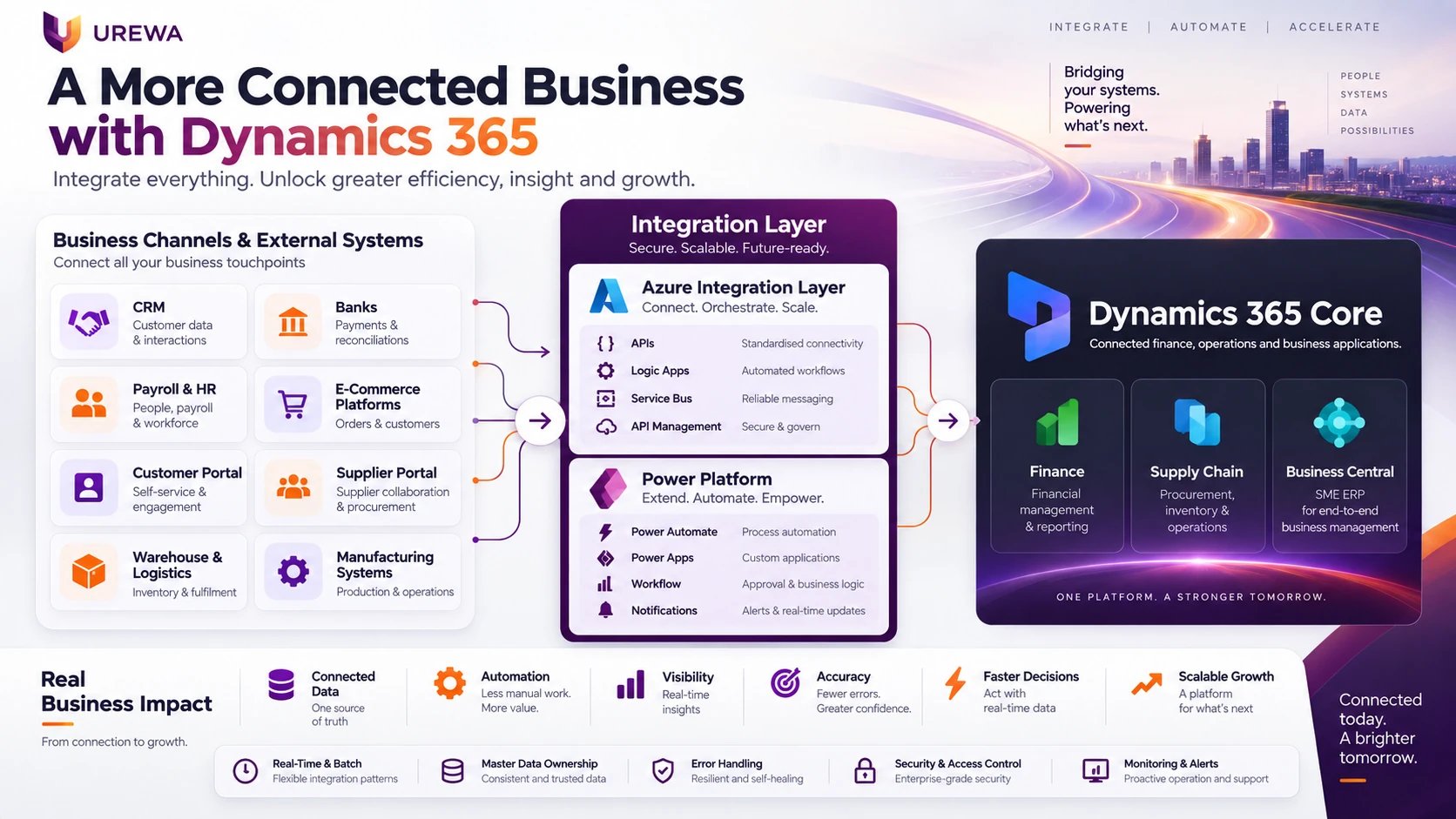
A company may use Microsoft Dynamics 365 Finance or Business Central for finance and operations, Dynamics 365 Sales for CRM, an external HR platform for payroll, one or more e-commerce platforms for online sales, banking portals for payments, warehouse applications for fulfilment, and separate systems for logistics, customer portals, procurement and reporting.
The challenge begins when these systems do not communicate. Employees start downloading Excel files, copying data between systems, reconciling transactions by hand, re-entering orders, checking payment status on separate portals, and maintaining the same master data in several places. That is where ERP integration becomes important.
01DefinitionWhat is ERP integration?
ERP integration is the process of connecting an enterprise resource planning platform — Dynamics 365 Finance, Supply Chain Management or Business Central — with other business applications, platforms, databases, APIs and external services. The objective is to let the right information move between systems automatically, or through controlled workflows.
Take a customer placing an order on an e-commerce portal. The integration may send the order to Dynamics 365, validate the customer and product, reserve inventory, initiate fulfilment, create the financial transaction, and return shipment and invoice information to the commerce platform. Without integration, that same process needs several manual steps.
For organisations using Dynamics 365, integration is not only about connecting software. It is about connecting business processes so information moves reliably between finance, sales, supply chain, customers, banks, employees, warehouses and portals.
02The LayersA typical Dynamics 365 integration architecture
A modern Microsoft Dynamics environment usually has five layers:
- 01Customer channelsE-commerce, customer portal, mobile app, marketplace
- 02Business applicationsDynamics 365 Sales, HR/payroll, WMS, logistics, procurement, banking
- 03Integration layerAPIs, Azure Integration Services, Power Platform, middleware, connectors
- 04Microsoft Dynamics ERPDynamics 365 Finance, Supply Chain Management, Business Central
- 05Business processesFinance, procurement, inventory, manufacturing, sales, projects, reporting
The role of the integration layer is to make sure information moves in a controlled, secure, traceable and reliable way.
03Five DecisionsHow does Dynamics 365 integration work?
A successful integration begins with five decisions:
- Which systems need to communicate?
- Which system owns each piece of information?
- Which data needs to move?
- How frequently should it move?
- What should happen if the integration fails?
Consider a CRM-to-ERP integration. Dynamics 365 Sales may own the lead and opportunity process, while Finance or Business Central owns invoicing, financial posting, inventory and payments. The integration should define clearly when data crosses that boundary.
The technologies typically involved include REST APIs, OData data entities, Azure Logic Apps, Azure Functions, Power Automate, Azure Service Bus, Dataverse, middleware platforms, custom connectors and scheduled data interfaces. Which one is right depends on the business process, not on preference.
04Design ChoiceReal-time vs batch integration
Not every integration needs to run in real time. This is one of the more consequential design decisions, and one of the most commonly got wrong.
| Real time suits | Batch suits |
|---|---|
| Inventory availability | Payroll journals |
| Order confirmation | Daily bank statements |
| Payment confirmation | Nightly master-data synchronisation |
| Customer credit status | Bulk order files |
| Shipment tracking | Large reporting datasets |
| Customer portal transactions | Historical transaction transfers |
If a customer orders online, the commerce portal needs immediate confirmation that stock exists — a real-time API call to Dynamics 365. A payroll journal, by contrast, moves once per cycle. Trying to make every integration real time increases technical complexity without creating business value.
05PaymentsBank integration with Dynamics 365
Banking is one of the most valuable integration areas, because payment processes are often the most manual. Organisations create vendor payments in Dynamics 365 Finance, then rely on external bank portals for execution, confirmation, UTR tracking, statement processing and reconciliation.
Vendor payment flow
- 01Dynamics 365Vendor invoices posted and approved
- 02Dynamics 365Payment proposal created
- 03Dynamics 365Payment file or API request generated
- 04BankPayment instruction received and processed
- 05BankPayment status returned, UTR reference generated
- 06Dynamics 365Payment status and UTR updated
- 07Dynamics 365Bank statement received, reconciliation completed
A bank integration can cover payment instructions, acknowledgements, UTR updates, payment status, bank statements in MT940 or similar formats, customer collections, reconciliation and failed-payment information. The objective is not simply to connect Dynamics 365 to a bank — it is to automate the complete payment and reconciliation lifecycle.
06JournalsPayroll and HR integration
Many organisations run payroll outside Dynamics 365. The HR platform handles employee records, attendance, calculations, reimbursements, taxes, deductions and benefits, while Dynamics 365 Finance remains the financial system of record. The integration transfers the financial impact of payroll into the ERP.
Payroll posting
- 01HR / payrollPayroll cycle completed, department-wise values generated
- 02IntegrationPayroll journal sent — GL lines, cost centres, taxes, statutory liabilities
- 03Dynamics 365GL accounts and financial dimensions validated
- 04Dynamics 365Journal created and reviewed by finance
- 05Dynamics 365Journal posted
This removes the need for finance teams to re-create payroll entries manually every month — typically one of the more error-prone recurring tasks in a close.
07Customer LifecycleDynamics 365 CRM integration
Dynamics 365 Sales manages leads, opportunities, quotations and the customer relationship. The ERP manages the customer master, sales orders, inventory, delivery, invoicing and payment. Integration lets the two work as one lifecycle.
Once an opportunity becomes a confirmed requirement, the relevant information moves from Sales into the ERP, which handles fulfilment and financial processing. Invoice status, order status, payment status and customer balance can then be exposed back to CRM, so sales teams stop having to ask finance for answers.

08ChannelsE-commerce, marketplaces and customer portals
This is the most important integration area for retail, distribution and trading businesses, many of which run several channels at once — a company web store, a B2B dealer portal, marketplaces such as Amazon or Flipkart, Shopify, and a mobile app.
Multi-channel order flow
- 01Commerce platformsOrders, customers, payments and returns captured
- 02Integration layerAPI management, transformation, validation, error handling
- 03Dynamics 365Sales orders, inventory, warehouse, finance, invoicing
- 04Commerce platformsOrder status, shipment details, availability and invoices returned
Product and inventory synchronisation
Commerce integration is not only about orders. Item numbers, descriptions, categories, prices, units, inventory, warehouse availability, tax information and product status may all need to move. The organisation must decide which system owns what. Typically Dynamics 365 owns the item master, inventory, price and product status, while the commerce platform owns marketing copy, SEO text, images and campaign content. That separation matters — integration should never create confusion over ownership.
Customer portals
A B2B customer can log in to see available products, pricing, quotations, orders, invoices, outstanding balance, shipments, payment status and account statements — and raise enquiries, orders, service requests, returns and payment confirmations that flow back into the ERP. Rather than the portal maintaining its own copy of operational data, it reads from Dynamics 365 or synchronises on a defined schedule. The result is a connected customer experience without giving anyone direct ERP access.
09OperationsWarehouse, logistics, suppliers and plant systems
Dynamics 365 sends sales orders, transfer orders, purchase orders, item information and warehouse instructions to an external WMS, which returns goods receipts, pick confirmations, packing details, shipment confirmations and inventory adjustments. The ERP stays responsible for the broader financial and operational process while the warehouse application handles specialised execution.
Shipment and tracking
- 01Sales order confirmed
- 02Warehouse shipment created
- 03Courier API called, shipping label generated
- 04Tracking number returned and stored in Dynamics 365
- 05Customer portal shows live tracking status
Suppliers and plant systems
Supplier portals can expose purchase orders, delivery schedules, forecasts, invoice and payment status, while suppliers return acknowledgements, dispatch details and invoices — reducing dependency on email and spreadsheets for companies with a large supplier base.
Manufacturers may also connect manufacturing execution systems, production equipment, quality management, weighbridges, IoT platforms and laboratory systems. Dynamics 365 releases a production order; the external system captures actual execution; quantities, scrap, consumption and quality results return to the ERP.
10TechnologyMicrosoft Azure and Power Platform
For complex landscapes, Azure Integration Services provide the foundation — Logic Apps, Functions, Service Bus, API Management, Event Grid, Storage and monitoring services. Instead of wiring ten external applications directly into Dynamics 365, Azure acts as a layer that manages routing, transformation, security, monitoring, retries and API access.
Power Platform has a role too. Power Automate suits workflow-driven integrations — approvals, notifications, document movement, simple API calls and event-driven processes. Power Apps can provide lightweight applications on Dynamics 365 or Dataverse. But it should be used carefully: a highly transactional enterprise integration usually needs a more scalable Azure-based architecture than Power Automate alone can offer.
11OwnershipMaster data ownership: the critical decision
Integration projects often fail because organisations focus on moving data before deciding who owns it. Every important data object should have a defined system of record.
| Data | Likely system of record |
|---|---|
| Customer master | Dynamics 365 or CRM |
| Product master | Dynamics 365 or a PIM |
| Employee master | HR system |
| Inventory | Dynamics 365 or WMS |
| Sales price | Dynamics 365 |
| Payroll | HR / payroll system |
| Financial transactions | Dynamics 365 Finance |
| Online marketing content | Commerce platform |
If two systems can independently update the same information, synchronisation problems appear quickly. A good design establishes who creates the data, who updates it, who consumes it, and which system is authoritative.
12ResilienceError handling, monitoring and security
An integration is not successful simply because transactions moved correctly in testing. Production systems fail, networks drop, APIs time out, data arrives incomplete, records duplicate and external systems reject messages. Every integration should define what happens when something goes wrong:
- What happens if the receiving system is offline?
- Can the transaction be retried, and by whom?
- How are failed messages identified and reprocessed?
- Who receives the alert?
- How are duplicates prevented?
- Is there a complete transaction history for reconciliation?
Security and access control
Integrations exchange financially and commercially sensitive data, so security belongs in the architecture rather than bolted on afterwards: secure API authentication, encryption, certificates, service accounts, permissions, IP restrictions, audit history, credential management and least-privilege access. A banking integration in particular may require certificate-based authentication depending on the bank.

13What Goes WrongCommon ERP integration challenges
- Poor master data. If customers, products, vendors or financial dimensions are inconsistent, integration simply moves bad data faster.
- Too many point-to-point connections. Wiring every application directly to every other one creates an architecture nobody can maintain.
- Unclear system ownership. If both CRM and ERP can create or update the same customer record, conflicts are inevitable.
- Weak error handling. The integration works for successful transactions and falls over the first time unexpected data appears.
- Incorrect real-time expectations. Real time is requested where scheduled or event-driven processing would be simpler and cheaper.
- Customisation dependency. A heavily customised ERP needs custom interfaces that become expensive to maintain.
- No monitoring. If failures are discovered when a business user complains, the integration is not being managed.
14MethodHow to plan a Dynamics 365 integration
A successful project starts with business processes, not APIs. Discover every system and the manual workarounds people use today. Prioritise the handful of integrations with the greatest impact — vendor payments, commerce orders, customer synchronisation, payroll posting, inventory. Define data ownership. Choose the pattern. Plan error handling before development begins. Test bad data, duplicates, timeouts and partial processing, not just the happy path. Reconcile. Then monitor after go-live.
How Urewa approaches it
We treat integration as a business-process design exercise first and a technical exercise second, across six stages:
| Stage | What happens |
|---|---|
| Discover | Understand the existing Dynamics 365 environment, external applications, business processes and the manual interfaces people rely on today. |
| Prioritise | Identify the integrations that deliver the strongest operational value first, rather than building everything at once. |
| Design | Define data ownership, integration frequency, security, error handling, reconciliation and architecture. |
| Build | Use the appropriate Microsoft technology — APIs, Power Platform, Azure integration services or other suitable middleware. |
| Validate | Test the complete business process from source system into the ERP, and back again where required. |
| Operate | Monitor integrations, resolve failures and improve performance after go-live. |
The objective is not to connect systems because they can be connected. It is to create reliable integrations that improve how the business actually operates.
When does a business need this?
These are the recurring signs that the technology landscape has grown faster than the integration architecture:
- Employees entering the same data more than once
- Excel files used to move transactions between systems
- Online orders manually re-created in the ERP
- Finance manually importing payroll journals each month
- Users checking bank portals for payment status
- CRM users with no visibility of invoices or orders
- Inconsistent customer or product information
- Inventory values differing across systems
- Manual reconciliation between platforms
- Integration failures discovered only when someone complains
The real value of ERP integration is not system-to-system connectivity. It is end-to-end process connectivity.
15QuestionsFrequently asked questions
What is Dynamics 365 integration?
Dynamics 365 integration connects Microsoft Dynamics applications with external systems so that data and business transactions can move between them automatically or through controlled workflows.
Can Dynamics 365 integrate with banks?
Yes. Depending on the bank and the interfaces it offers, Dynamics 365 can integrate for vendor payments, payment status, UTR references, bank statements, collections and reconciliation processes.
Can payroll systems integrate with Dynamics 365 Finance?
Yes. External HR and payroll systems can send payroll journals, department-wise cost information, expenses, taxes and other financial information into Dynamics 365 Finance.
Can Dynamics 365 integrate with multiple e-commerce platforms?
Yes. Multiple commerce channels can be connected through APIs, middleware, Azure services or other integration technologies so that orders, customers, products, inventory, shipment information and payments stay synchronised with Dynamics 365.
Can Dynamics 365 Sales integrate with Finance or Business Central?
Yes. CRM and ERP can be connected so customer, order, invoice, payment and other information moves between commercial and operational processes.
Should all Dynamics 365 integrations be real time?
No. Some processes benefit from real-time integration, while others are better suited to scheduled or batch processing. The integration pattern should follow the business requirement, not a preference for the newest approach.
What is the role of Azure in Dynamics 365 integration?
Azure can provide an enterprise integration layer for APIs, message processing, transformation, monitoring, security and communication between Dynamics 365 and external applications.
What is the most important step before building an integration?
Defining the business process and identifying the system of record for each data object. Without that, integration simply moves inconsistent data faster.
Can Power Automate be used for Dynamics 365 integrations?
Yes, for workflow-driven and event-based scenarios. More complex, high-volume or business-critical integrations may require Azure or other enterprise integration technologies.
How can organisations monitor Dynamics 365 integrations?
Monitoring should cover transaction status, failed messages, retries, alerts, reconciliation, logging and operational dashboards so problems are identified before a business user notices them.
Considering Dynamics 365 Integration?
If your environment still depends on manual Excel uploads, duplicate data entry, separate banking processes or disconnected portals, it may be time to review the integration architecture. We will show you where integration reduces manual work and where it is not worth the cost.
Or email us directly: info@urewa.com