







What Is Microsoft Dataverse? The Data Foundation Behind Power Platform and Dynamics 365
Modern businesses use many applications, but their data should not become a maze of disconnected spreadsheets and systems. Learn how Dataverse structures business information, supports secure apps and connects Power Platform with Dynamics 365.
- Power Platform
- Urewa Editorial
- Practical guide
- 12 min read
- 2026
Contents
Modern businesses rarely operate through a single application. Customer information may live in CRM, financial and operational transactions in ERP, and departmental processes in spreadsheets or specialist applications. As this landscape grows, one question becomes important: where should business data live, and how should applications securely work with it?
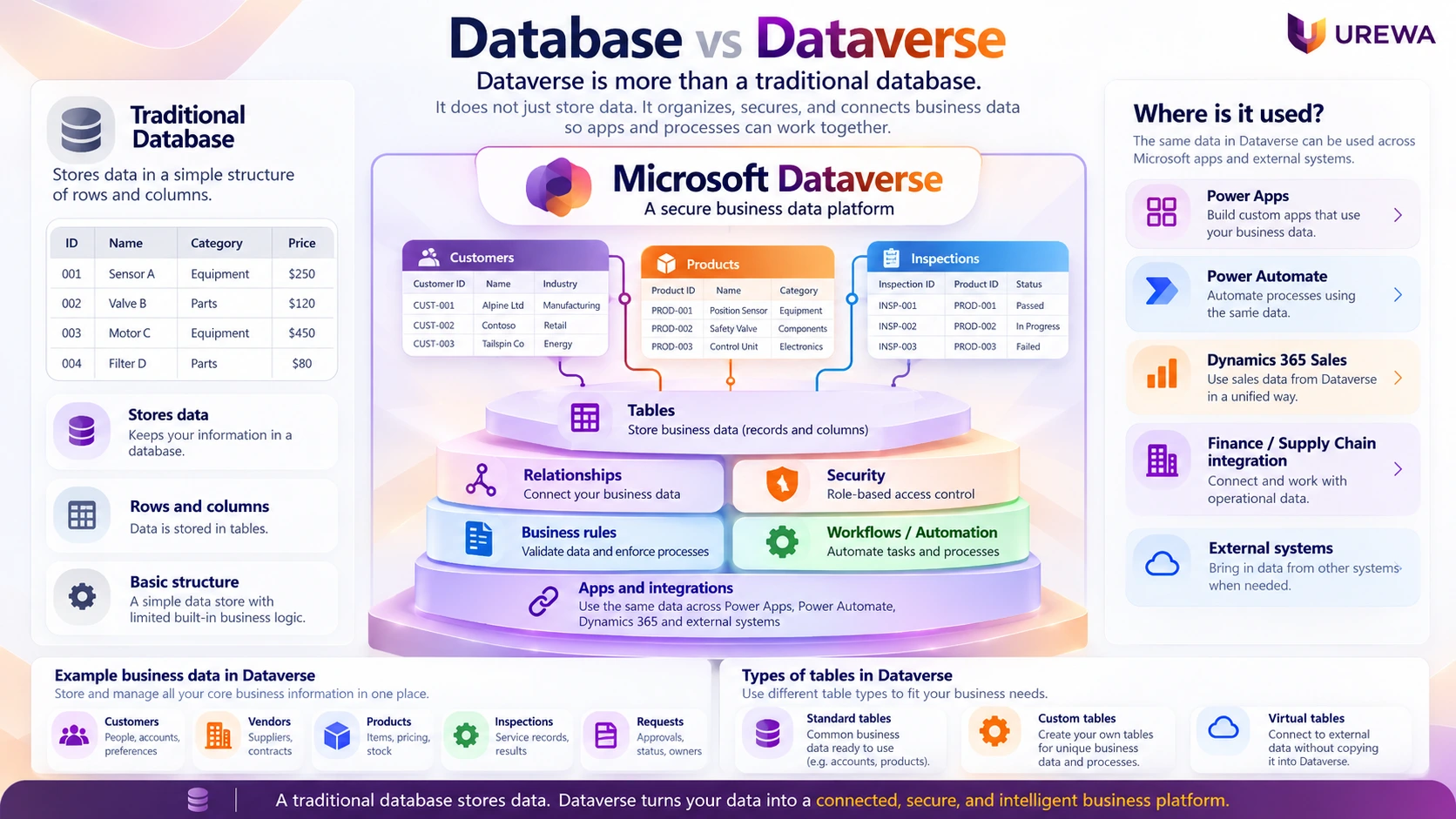
Microsoft Dataverse is a managed cloud data platform used with Microsoft Power Platform and Dynamics 365. It lets organizations structure business information, define relationships, apply security, introduce business logic and make data available to apps, workflows and integrations.
01DefinitionWhat is Microsoft Dataverse?
Dataverse organizes information into tables. Rows represent records and columns describe attributes. A business might have tables for Customers, Projects, Inspections, Assets, Service Requests and Vendor Requests. Relationships connect records—for example, one customer may have multiple orders or one asset may have multiple inspections.
02PlatformDataverse is more than a database
- Data: tables, columns, relationships and metadata.
- Security: roles, users, teams, ownership and permissions.
- Business logic: validation, business rules and processes.
- Application platform: a foundation for Power Apps, Power Automate and integrations.
A conventional database stores information. Dataverse adds business-application services around it. For example, a business can require mandatory fields before a record progresses, limit access based on a user's role, and trigger automation when a record changes.
03Data ModelTables, relationships and table types
Imagine digitizing equipment inspections. You could model Equipment, Inspection, Inspector, Inspection Result and Corrective Action as related records. A Power App provides the interface, Dataverse stores structured data, Power Automate can send alerts, and Power BI can analyze trends.
Standard tables cover common concepts such as Accounts and Contacts. Custom tables model organization-specific processes such as Vendor Assessment or Equipment Calibration. Virtual tables can expose supported external data without requiring a duplicate copy to be stored in Dataverse.

04Connected AppsDataverse and Microsoft Power Platform
- Power Apps: build business applications.
- Power Automate: automate workflows and processes.
- Power BI: analyze and visualize information.
- Power Pages: build external-facing web experiences.
- Dataverse: store and govern structured business data.
Not every Power App requires Dataverse. It becomes especially useful when apps need related records, business-oriented security, shared data, governed processes or close alignment with Dynamics 365.
05Use CasesPractical examples: vendor onboarding and quality inspection
For vendor onboarding, Power Apps or Power Pages can collect details, Dataverse can store the request and status, Power Automate can route approvals, Dynamics 365 Finance can receive approved vendor information through a suitable integration, and Power BI can report cycle times.
For manufacturing inspections, a Power App can capture item, batch, date, result, measurements and corrective actions. Dataverse stores the records, Power Automate can escalate failed inspections, and Power BI can analyze rejection trends.
06ArchitectureDataverse and Dynamics 365: an important distinction
Many Dynamics 365 customer-engagement applications use Dataverse extensively. Dynamics 365 Finance and Supply Chain Management run on the Finance and Operations application platform; their transactional data does not automatically become Dataverse data. When these environments need to work together, integration patterns such as dual-write and virtual tables may be appropriate.
Dual-write provides synchronous integration between Finance and Operations apps and Dataverse for supported shared business concepts. Before choosing a pattern, define the system of record, fields to synchronize, expected volumes, conflict handling and monitoring.
07ControlsSecurity and data governance
Dataverse supports security concepts including roles, users, teams, business units, record ownership, sharing and column-level security. A salesperson might access their own opportunities, a regional manager might access team records, and sensitive fields may need tighter permissions.
Security still needs deliberate design. Organizations should establish who owns each record, which app is the system of record, who can create or update information, which fields are mandatory, who can delete records, how long data is retained and which systems need it.
08AutomationBusiness logic and automation
Dataverse business rules can validate records, set values or require information. Power Automate can route approvals, assign service requests, send notifications or trigger corrective actions. The aim is to remove repetitive work while preserving human judgement where it is needed.
09ALMApplication lifecycle management
Production applications should not normally be built and changed directly in production. Power Platform environments and Solutions help package and move apps, Dataverse tables and automation between stages.
- Development: build and configure.
- Test / SIT: test integrations and end-to-end processes.
- UAT: let business users validate requirements.
- Production: deploy the approved solution.
Low-code does not mean no architecture. Enterprise apps still need governance, testing, version control, deployment management and support.
10Choosing ToolsDataverse vs Excel vs SharePoint vs Azure SQL
| Requirement | Excel | SharePoint Lists | Dataverse | Azure SQL |
|---|---|---|---|---|
| Personal analysis | Strong | Limited | Possible | Possible |
| Simple team tracking | Possible | Strong | Strong | Possible |
| Relational business data | Limited | Limited | Strong | Strong |
| Business-oriented role security | Limited | Moderate | Strong | Application design required |
| Model-driven apps | No | No | Yes | No |
| Direct SQL control | No | No | Limited | Strong |
Excel remains useful for analysis, SharePoint may suit simple collaboration, Dataverse can support governed relational business apps, and Azure SQL may suit applications needing direct database-oriented control. Large-scale analytics may need a data platform designed for that purpose.
11FitWhen should you use Dataverse?
Consider Dataverse when you need structured relational data, Power Apps, role-based security, workflow automation, multiple applications sharing records and Dynamics 365 alignment. Common scenarios include vendor onboarding, customer onboarding, inspections, approvals, field processes and extensions to Dynamics 365.
It may not be needed for every spreadsheet, simple team list or analytical workload. Start with the business problem, then select the appropriate technology.
12ArchitectureUrewa's approach to Dataverse architecture
At Urewa Technologies, Dataverse should be considered as part of the wider Microsoft business-application architecture. We assess the process to improve, data ownership, application fit, integration pattern, security, automation, lifecycle and governance before recommending a solution.
13Key TakeawayConclusion
Microsoft Dataverse is more than cloud database storage. It combines tables and relationships with security, business logic, automation and application-platform capabilities. Its value is greatest when multiple applications and processes need governed business information.
Use Dataverse when the business needs a governed application platform around shared data—not simply because Dataverse is available.
14QuestionsFrequently asked questions
What is Microsoft Dataverse?
Microsoft Dataverse is a managed cloud business-data platform used with Power Platform and Dynamics 365. It provides structured tables, relationships, security, business logic and application-development capabilities.
Is Dataverse a database?
Dataverse includes managed cloud data storage, but it is broader than a traditional database because it also provides business security, metadata, relationships, business logic and application-platform capabilities.
Is Dataverse part of Power Platform?
Yes. Dataverse is closely integrated with Power Platform and can be used with Power Apps, Power Automate, Power BI and Power Pages.
Does Dynamics 365 use Dataverse?
Many Dynamics 365 customer-engagement applications use Dataverse extensively. Finance and Operations applications have their own application platform and can integrate with Dataverse through patterns such as dual-write and virtual tables.
What is a virtual table?
A virtual table can expose supported external information as Dataverse records without requiring a duplicate copy of the underlying data to be stored in Dataverse.
Can Dataverse replace Excel?
For structured multi-user business processes requiring relationships, security and automation, Dataverse may be more appropriate. Excel remains useful for personal analysis, calculations and ad-hoc scenarios.
Is Dataverse better than SharePoint Lists?
Not universally. SharePoint may be sufficient for simple collaborative lists. Dataverse becomes more compelling as relational complexity, business security, application logic and Dynamics integration requirements increase.
Should every Power App use Dataverse?
No. Choose a data platform according to process complexity, relationships, security, volumes, integrations, governance and long-term requirements.
Planning a Power Platform or Dataverse Solution?
We can help assess your business processes, Dataverse architecture, Power Apps requirements, integrations, security and governance needs.
Or email us directly: info@urewa.com