







ERP Data Migration to Dynamics 365: A Step-by-Step Guide for Businesses
A migration can technically complete and still create major business problems if the data is incomplete, duplicated, incorrectly mapped or not reconciled. This guide covers scope, cleansing, mapping, mock migrations, reconciliation, cutover and post-go-live validation.
- Data Migration
- Abhishek Divekar
- Step-by-step guide
- 13 min read
- 2026
Contents
Implementing a new ERP system is not only about configuring processes and training users. One of the most critical activities is making sure the new system starts with accurate, relevant and trusted business data. Customer records, vendors, products, inventory, open purchase orders, sales orders, financial balances and other operational information may need to move from existing systems into Microsoft Dynamics 365.
A migration can technically complete successfully and still create major business problems if the information is incomplete, duplicated, incorrectly mapped or not reconciled. That is why ERP data migration should not be treated as an IT import exercise.
A successful ERP migration is not measured by how many records were imported. It is measured by whether the business can trust and operate with the migrated data.
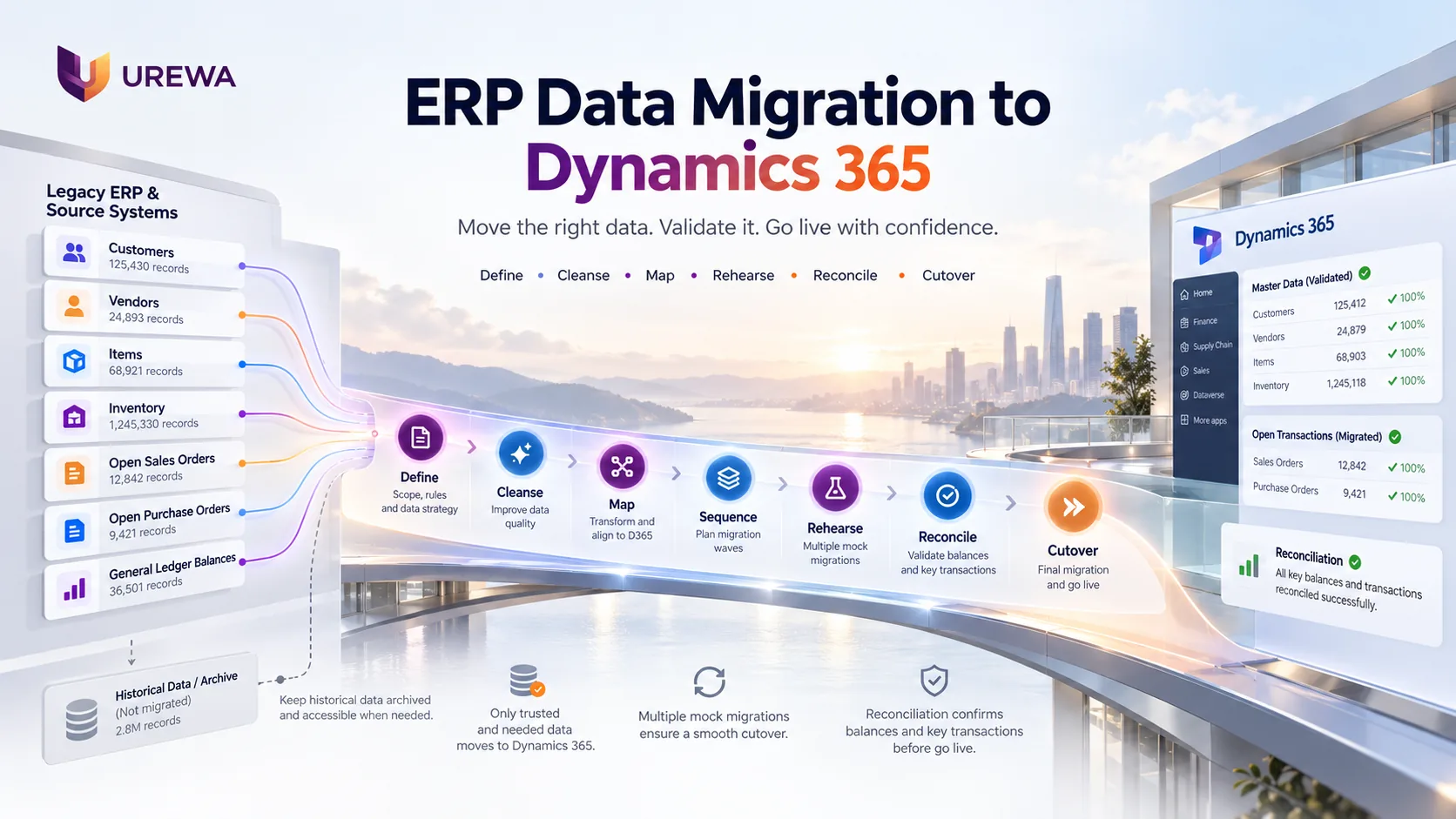
This guide explains a practical approach to ERP data migration into Dynamics 365, from defining scope and cleansing data through mock migrations, reconciliation, cutover and post-go-live validation. It is the data workstream inside the wider ERP modernization assessment and the delivery approach we follow on every implementation.
01DefinitionWhat is ERP data migration?
ERP data migration is the process of extracting business information from existing systems, preparing and transforming it, and loading it into a new ERP environment. For a Dynamics 365 implementation, information may come from:
- Legacy ERP systems
- Accounting applications
- Excel files
- CRM platforms
- Inventory applications
- Manufacturing systems
- Departmental databases
- Other business applications
Microsoft distinguishes between configuration data and migration data. Configuration data establishes the application environment, for example currencies, tax codes and parameters. Migration data is business information such as customers, vendors, products and open transactions. Understanding this distinction early makes migration planning much easier.
02ScopeDecide what data actually needs to move
One of the biggest migration mistakes is assuming that everything in the legacy system should move into Dynamics 365. That is rarely necessary. A practical migration first classifies the data.
| Data category | Examples | Typical treatment |
|---|---|---|
| Configuration data | Currencies, tax codes, parameters | Configure or migrate into the target environment |
| Master data | Customers, vendors, items, accounts | Clean, validate and migrate |
| Open transactions | Open sales orders, purchase orders, AR/AP, projects | Migrate and reconcile |
| Opening balances | GL, inventory, bank, fixed assets | Migrate with formal business reconciliation |
| Recent history | Selected operational transactions | Migrate only where genuinely required |
| Older history | Closed historical transactions | Often better retained through archive or reporting |
Microsoft’s current Dynamics 365 guidance similarly identifies migrated data primarily as master data and open transactions such as sales orders, purchase orders, stock on hand and open balances. The first migration question should therefore not be “How do we move all our old data?” It should be: what information does the business genuinely need in Dynamics 365 on Day 1?
03ScopeDecide what should not be migrated
A new ERP should not become a cleaner-looking copy of a poor legacy database. Before migration, identify information that no longer deserves to move forward:
- Duplicate customers or vendors
- Obsolete product records
- Inactive employees
- Unused reference codes
- Closed transactions with no operational value
- Temporary historical records
- Old custom fields
- Redundant reporting data
Historical information may still need to stay accessible for audit, regulatory or customer-service reasons, but accessible does not always mean it has to live inside the production ERP. Current operational information can go into Dynamics 365 while older history sits in an archive or reporting environment. Reducing unnecessary data also reduces migration effort, testing volume and cutover risk.
04GovernanceEstablish data ownership
ERP data belongs to the business, not only to IT. Technology teams build the extraction and migration processes, but they should not be solely responsible for deciding whether business information is correct. Each major data area needs a clearly identified owner.
| Function | Owns |
|---|---|
| Finance | Chart of accounts, financial dimensions, opening balances and outstanding AR/AP |
| Procurement | Vendor information |
| Sales | Customer information |
| Supply Chain | Products, inventory dimensions, warehouses and stock |
| Manufacturing | BOMs, routes and production-related master data |
Microsoft’s data management and governance checklist recommends identifying data owners and appointing a data steward to apply and monitor governance principles. A useful rule of thumb: IT can move the data. The business must approve the data.
05Data QualityAssess and clean the source data
Before mapping anything into Dynamics 365, assess the existing information for quality. Common issues include:
- Duplicate records
- Invalid addresses
- Missing tax information
- Incorrect units of measure
- Inactive products
- Old customer records
- Inconsistent vendor naming
- Invalid codes
- Incomplete financial dimensions
Poor source data does not become better simply because it is transferred into a new ERP. Two supplier records for the same vendor can lead to duplicate balances or purchasing confusion after go-live, and an incorrect unit of measure can create serious inventory problems. Cleansing should happen before final migration, with business users validating the areas they understand. Microsoft’s checklist also calls for realistic data-quality assessments and enough cleanup effort before migration.
06TransformationMap legacy data to the Dynamics 365 structure
Legacy ERP systems and Dynamics 365 may represent the same business information differently. Data mapping defines how the old structure translates into the new one. The migration needs transformation logic, not simply field copying.
| Area | Legacy ERP | Dynamics 365 | Mapping |
|---|---|---|---|
| Customer group | Customer Type = 01 | Customer group = DOMESTIC | 01 → DOMESTIC |
| Unit of measure | EA, PC, NOS | One standard unit (for example ea) | EA / PC / NOS → ea |
| Financial structure | Account = 500010 | Main account 500010 plus Department and Cost center | Account split into main account and dimensions |
A mapping document should define, for every field:
- Source field
- Target field
- Transformation
- Default values
- Validation rules
- Data owner
- Exception handling
07DependenciesMigration sequence matters
Data normally cannot be loaded into Dynamics 365 in a random order, because dependencies exist. A transaction that depends on a customer, item, financial dimension or warehouse cannot load correctly if that master information is not already there.
A typical load order
- 01Reference and setup data
- 02Customer and vendor groups
- 03Customers and vendors
- 04Products and items
- 05Inventory and open transactions
Dynamics 365 data packages can contain multiple data entities and load them in a defined sequence. Migration planning should therefore cover not only what data moves, but the order in which it moves.
08ToolingUse Dynamics 365 data management appropriately
Dynamics 365 Finance and Supply Chain Management provide a data management framework designed for migration, configuration and integration scenarios. It uses:
- Data entities
- Data projects
- Data jobs
- Data packages
- Import and export processes
- Staging and error handling
Microsoft describes a data entity as a business-level abstraction over underlying tables, such as customers or vendors, which can be reused for both migration and integration. Other Dynamics 365 applications, including Business Central, use different tooling, so confirm the right approach for each application in scope.
The technology matters, but migration success depends far more on correct scope, clean data, accurate mapping, testing and reconciliation. A powerful migration tool cannot compensate for poor business decisions. Note too that migration and integration solve different problems: migration moves data once as part of a transition, while integration keeps it moving afterwards. Our guide to ERP integration with Dynamics 365 covers the second.
09RehearsalRun multiple mock migrations
The final production migration should never be the first time the complete process is executed. A mature approach includes several cycles.
| Cycle | The question it answers |
|---|---|
| Cycle 1 — Technical validation | Can the data be extracted, transformed and loaded successfully? |
| Cycle 2 — Business validation | Do users confirm that customers, vendors, products, balances and transactions are correct? |
| Cycle 3 — Volume and performance | Can the migration handle realistic production volumes? |
| Mock cutover / dress rehearsal | Can the complete migration sequence finish within the planned cutover window? |
| Production migration | Execute the proven process against final approved source data. |
Microsoft’s cutover guidance describes a mock cutover or dress rehearsal that mirrors the real event as closely as possible, with the same data, tools, people and timing, repeated until the team is confident. The principle is simple: migration should become repeatable before it becomes final.
10ProofReconciliation matters more than record counts
Suppose the legacy ERP holds 25,000 customers and Dynamics 365 also holds 25,000 after migration. Does that prove the migration succeeded? No. Record counts are a useful technical check, but they do not prove the business position is correct. Migration needs business reconciliation.
| Area | What must agree |
|---|---|
| Finance | Legacy closing GL against Dynamics opening GL; AR ageing total against migrated customer balances; AP ageing total against migrated vendor balances |
| Inventory | Verified legacy inventory quantity and value against Dynamics opening inventory quantity and value |
| Sales and procurement | Open sales and purchase quantities and amounts |
| Fixed assets | Acquisition cost, accumulated depreciation and net book value |
Technical validation confirms that records loaded. Business reconciliation confirms that the business position is correct. Both are required.
11Cutover WindowTest migration performance before go-live
For small datasets, migration speed creates little risk. For a large organization with millions of records and a limited cutover window, performance becomes critical. If the window is eight hours, the project must know before go-live whether the complete final migration finishes in six hours, eight hours or sixteen. That cannot be guessed. It has to be proven through realistic test runs.
Microsoft’s guide to optimizing data migration for finance and operations apps recommends testing with subsets of data before scaling up, running a mock cutover, and recording the settings of each test run so the best configuration can be found. It also cautions that results from a small development environment should not be extrapolated to higher-tier environments. A strong cutover plan therefore accounts for: data volume + migration duration + validation duration + contingency.
12Go-LivePrepare a controlled cutover plan
Cutover is the final transition from the legacy environment into Dynamics 365. Go-live should be viewed as a controlled business transition, not simply the final technical import.
A typical cutover sequence
- 01PrepareFinal readiness confirmed.
- 02FreezeAgreed legacy master and transaction changes stop.
- 03ExtractFinal source data is collected.
- 04TransformApproved transformation and mapping rules are applied.
- 05LoadData is loaded in the required sequence.
- 06ValidateTechnical validation and business reconciliation are completed.
- 07Go / No-GoBusiness owners confirm readiness.
- 08ReleaseUsers start operating in Dynamics 365.
The cutover plan should clearly define, for every step:
- Task
- Owner
- Planned time
- Dependency
- Validation
- Sign-off
- Contingency
Microsoft’s guidance similarly expects a cutover plan covering task order and timing, owners and backups, verification and sign-off, and a rollback plan, practised before it is executed in production. The same rehearsal discipline sits behind the delivery stages described in our Dynamics 365 implementation approach.
13ProtectionProtect sensitive migration data
Migration files often hold sensitive information: customer details, bank accounts, tax IDs, employee information, supplier banking details and financial balances. Temporary migration files and staging environments therefore need to be properly controlled. Consider:
- Restricted access
- Secure storage
- Defined migration roles
- Controlled sharing
- Removal of unnecessary temporary files
- Appropriate audit and monitoring
Migration speed should never come at the cost of data security.
14ManufacturingPractical example: migrating a manufacturing business
Consider a manufacturer moving from a legacy ERP to Dynamics 365 Finance and Supply Chain Management. Its existing environment holds:
- 25,000 customer records
- 8,000 vendors
- 40,000 items
- 2,500 open purchase orders
- 1,800 open sales orders
- 10 years of financial history
- 3 years of detailed inventory history
The migration assessment may decide:
| Decision | What it covers |
|---|---|
| Migrate | Active customers, vendors and products; open purchase and sales orders; inventory; opening balances; required master data |
| Archive | Older closed transactions and historical information not needed operationally in Dynamics 365 |
| Clean | Duplicate vendors, inactive products, incorrect addresses, obsolete codes |
| Transform | Customer groups, product categories, units of measure, financial dimensions |
| Rehearse | Several mock migrations and a final cutover rehearsal |
| Reconcile | GL, AR, AP, inventory and open orders |
| Final cutover | Extract final deltas, migrate them in sequence, reconcile the results and obtain business sign-off |
This example shows why ERP migration is more than an import process. It requires business decisions, technical execution and formal validation working together.
15Our MethodUrewa's Dynamics 365 data migration approach
At Urewa Technologies we treat data migration as a dedicated implementation workstream rather than something performed near go-live. Our approach has seven stages.
- Define Confirm scope, source systems, data categories, ownership, volumes and acceptance criteria.
- Clean Identify and resolve duplicates, incomplete records, outdated information and inconsistent codes.
- Map Define source-to-target fields, transformations, default values and validation rules.
- Sequence Determine entity dependencies and migration order.
- Rehearse Run multiple migration cycles using increasingly realistic data and volume.
- Reconcile Business owners validate financial balances, inventory, open transactions and key master information.
- Cut over and stabilize Execute the final migration, obtain business sign-off and monitor data quality during hypercare.
Our objective is not simply to move the legacy data into Dynamics 365. It is to make sure Dynamics 365 starts with data the business can trust. This workstream is part of our Dynamics 365 implementation services.
16Avoid TheseCommon ERP data migration mistakes
Several migration problems appear repeatedly across ERP projects.
- Migrating everything: More data creates more complexity without necessarily creating more value.
- Cleaning too late: Data cleansing should not begin just before production migration.
- Making IT responsible for business validation: Business owners must approve business data.
- Testing only once: Migration should become repeatable through multiple cycles.
- Checking only record counts: Balances and operational positions must also reconcile.
- Ignoring cutover duration: Large migrations must prove they can finish within the business window.
- Underestimating historical data: Decisions around history and archiving should be made early.
Avoiding these mistakes can significantly reduce go-live risk.
17Next StepsConclusion: trusted data is the goal
ERP data migration is one of the most important workstreams in a Dynamics 365 implementation. It involves far more than extracting information from one system and loading it into another. Organizations need to make deliberate decisions about data scope, ownership, cleansing, mapping, transformation, sequencing, mock migrations, reconciliation, cutover and post-go-live validation.
The strongest programs do not try to move the maximum amount of information. They move the right information accurately and prove the business can trust it.
Clean what matters. Migrate what is needed. Reconcile what is critical. Archive what does not belong in the new ERP.
18QuestionsFrequently asked questions
What is ERP data migration?
ERP data migration is the controlled process of extracting, cleansing, transforming, loading and validating business information when moving from one ERP environment to another.
What data is normally migrated to Dynamics 365?
Typical migration data includes customer, vendor and product master data together with operational information such as open sales orders, purchase orders, stock on hand and open financial balances.
Should all historical data be migrated?
Not necessarily. Older historical information may be retained through an archive or reporting solution if it does not need to remain operational inside Dynamics 365.
What is a mock migration?
A mock migration is a controlled rehearsal of the migration process before production go-live. It helps validate mapping, data quality, migration timing, sequencing and reconciliation.
What is data reconciliation?
Data reconciliation confirms that the target Dynamics 365 environment represents the correct business position. Examples include reconciling GL balances, AR/AP, inventory quantities and open transactions against approved legacy figures.
What is the difference between migration and integration?
Migration normally moves information as part of a system transition. Integration allows information to continue moving between systems after implementation.
Who should validate migrated ERP data?
Business owners should validate the data they understand and own. Finance should validate financial information, supply-chain teams should validate inventory and products, procurement should validate vendors, and so on.
What Dynamics 365 tools support data migration?
Dynamics 365 Finance and Operations applications include Data Management capabilities based on data entities, projects and packages for structured data import, export and migration. Other Dynamics 365 applications use different tooling, so confirm the right approach for each application in scope.
How many migration cycles should an ERP project perform?
There is no universal number. The project should perform enough cycles to prove mapping accuracy, business validation, migration performance and cutover repeatability before production migration.
What is the most important ERP migration principle?
Do not measure success only by whether the data loaded. Measure success by whether the business can trust the migrated information and continue operating correctly after go-live.
Planning a Dynamics 365 Data Migration?
If you are moving from a legacy ERP, consolidating systems or preparing for Dynamics 365 Finance and Supply Chain Management, Urewa can help assess:
Migration scope, data quality, source systems, master-data ownership, mapping and transformation, open transactions, historical-data strategy, mock migration planning, financial and inventory reconciliation, cutover readiness.
Before moving large volumes of legacy information, define what should migrate, who owns it and how success will be validated. Email: info@urewa.com