







What Is Microsoft Copilot Studio? How AI Agents Connect Knowledge, Systems and Business Actions
AI in business is moving beyond question-and-answer. The real question is no longer “Can AI answer this?” but “Can AI help move this business process forward safely?” This guide explains how Copilot Studio agents work with Dynamics 365, and where human control still matters.
- AI Agents
- Abhishek Divekar
- Practical guide
- 15 min read
- 2026
Contents
- Answers to Actions
- What It Is
- Chatbot vs Agent
- How It Works
- Instructions
- Knowledge
- Tools
- Orchestration
- Purchase Order Example
- Dynamics 365 Apps
- Power Automate
- No API Available
- MCP
- Identity & Governance
- Human Approval
- Testing Agents
- How Much Autonomy
- Business Value
- First Use Case
- Urewa's Approach
- The Bigger Shift
- Conclusion
- FAQ
For many organizations, the next step in AI is not another chatbot. It is creating AI agents that can understand a business request, access trusted information, interact with approved systems, perform defined actions, and involve people when judgement or approval is required.
This is where Microsoft Copilot Studio becomes relevant. For organizations already using Microsoft Dynamics 365, Power Platform and Microsoft 365, the opportunity can be particularly interesting.
The question is no longer simply “Can AI answer this question?” It is increasingly “Can AI help move this business process forward safely?”
01The ShiftFrom answers to actions: a simple Dynamics 365 example
Consider a manufacturing company using Dynamics 365 Supply Chain Management. At 4:30 PM, a supplier tells the procurement team that an important component due next week will now arrive eight days later. A traditional process involves several manual steps:
- Someone reads the supplier email.
- They locate the purchase order.
- They identify the affected item.
- They determine whether production or customer commitments may be impacted.
- They contact the planner or buyer.
- They update a task or record.
- They follow up later.
Now consider how different types of AI assistance could support the same situation.
| Level | What it does |
|---|---|
| Basic chatbot | Answers “What is our process when a supplier changes a confirmed delivery date?” by returning the procurement policy. Useful, but the employee still performs the process manually. |
| Knowledge-enabled agent | Understands the request and retrieves the right internal procedure, supplier policy or purchasing guidance. |
| Connected agent | With the right tools, integrations and permissions, retrieves purchase order or supplier details from connected business systems. |
| Action-enabled agent | Can initiate an approved follow-up workflow, create a task, send a notification or request human approval before an important action. |
| Agentic scenario | Coordinates several knowledge sources and tools in a multistep process, instead of every conversational path being scripted in advance. |
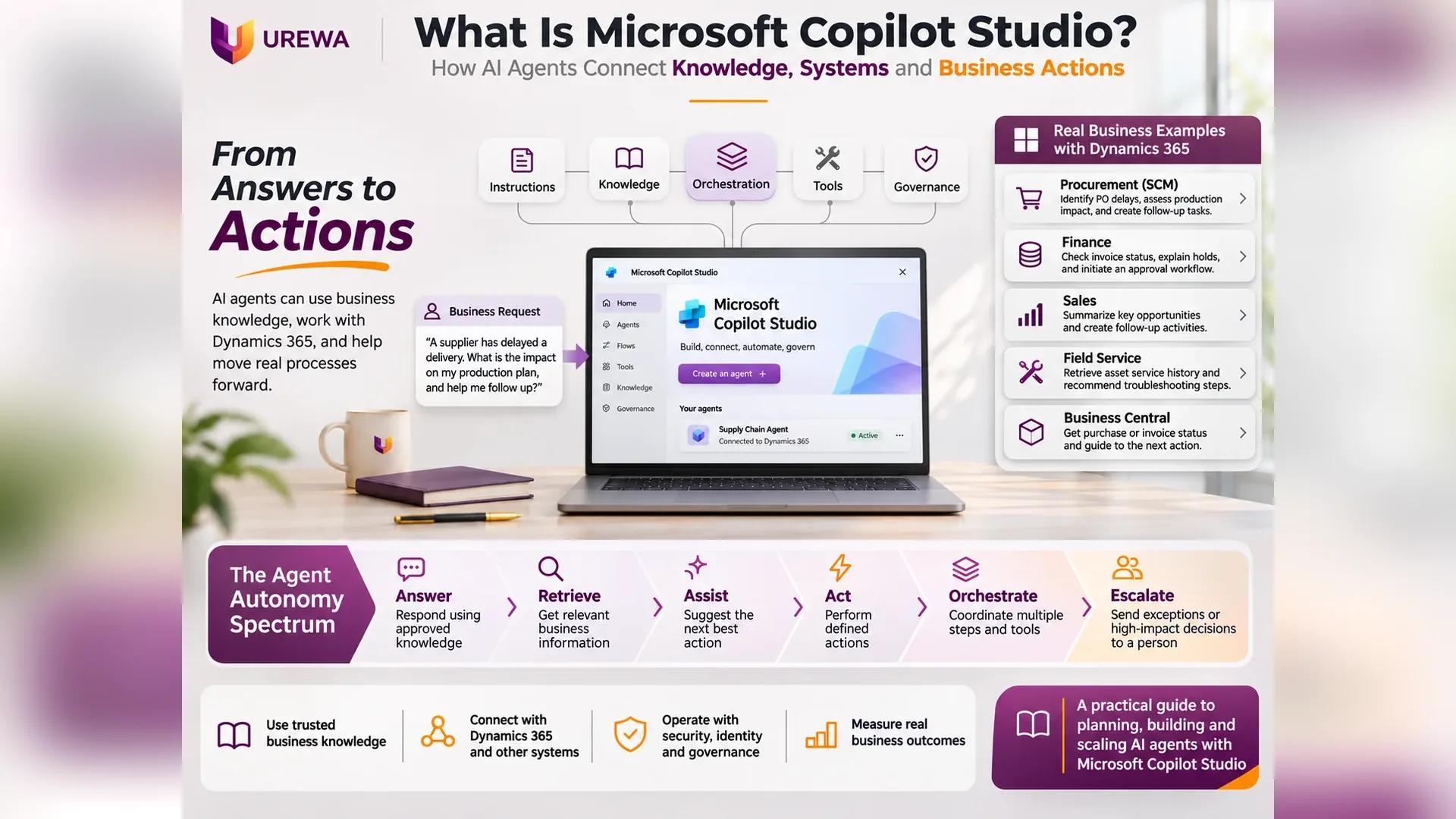
Copilot Studio supports agents that combine knowledge with actions, workflows, APIs and other tools. The important difference is that the AI is no longer only providing an answer. It is beginning to participate in the business process. That transition, from answers to actions, is central to understanding Copilot Studio.
02DefinitionWhat is Microsoft Copilot Studio?
Microsoft describes Copilot Studio as a graphical, low-code environment for building and managing AI agents and workflows. Organizations can use it to create agents that understand natural-language requests, use approved business knowledge, access connected systems, invoke tools or workflows, and respond through the channels where users already work.
An agent is designed around a specific business objective. A Dynamics team might build one to support questions such as:
- “Show me the current status of this customer opportunity.”
- “What is the approval status of this purchase requisition?”
- “Which work orders are still open for this customer asset?”
- “Help me understand why this vendor invoice is on hold.”
- “Create a follow-up task for this sales opportunity.”
- “Explain our company's purchase approval policy before I submit this request.”
The exact actions available depend on how the agent is designed, which systems are connected, which tools exist and what permissions have been granted. Copilot Studio should therefore not be thought of simply as a chatbot builder. It is increasingly a platform for connecting conversation, knowledge, business systems and controlled actions.
03DifferenceChatbot vs AI agent: what is the difference?
A traditional chatbot is built around predefined conversation paths or frequently asked questions. A Dynamics 365 Finance user might ask “Where can I view vendor transactions?” and a traditional bot can provide navigation guidance.
An AI agent can operate at a broader level. The user might instead ask “Why has this vendor invoice not moved to payment yet?” A properly configured agent may need to decide what information is relevant, retrieve data from an approved source, understand the business context and guide the user toward the next action. The progression looks like this:
| Capability | Example |
|---|---|
| Answer | Explain the vendor invoice approval process |
| Retrieve | Retrieve relevant invoice or supplier information |
| Assist | Explain the likely next step |
| Act | Trigger an approved workflow or create a task |
| Orchestrate | Coordinate several tools or steps |
| Escalate | Send the exception to an authorized person |
The objective is not necessarily maximum autonomy. It is the appropriate level of autonomy for the business process and the level of risk involved.
04Five ElementsHow Microsoft Copilot Studio works
A useful way to understand Copilot Studio is as five core elements: Instructions + Knowledge + Tools + Orchestration + Governance. Together they determine what an agent understands, what it knows, what it can do, how it chooses its next step and what boundaries apply.
| Element | Question it answers |
|---|---|
| Instructions | What the agent is for, who uses it and where its boundary sits. |
| Knowledge | The trusted organizational information it can reference. |
| Tools | The retrieval and actions it can perform through workflows, APIs and connectors. |
| Orchestration | How it chooses the right knowledge, tool or step for a request. |
| Governance | The identity, permissions, approvals and monitoring that bound it. |
05PurposeInstructions: what is the agent supposed to do?
Every useful business agent needs a clearly defined purpose. An organization should establish:
- who will use the agent
- what business processes it supports
- what information it may use
- what actions it may take
- and what it must not do
Imagine a Dynamics 365 Finance agent intended to support Accounts Payable users. Its purpose might include helping users understand invoice status, locating approved process documentation, identifying missing information and guiding employees to the correct next step. That does not automatically mean it should be allowed to post invoices or release payments. Those actions carry greater financial risk and may need separate controls and human approval. Clear instructions define both the capability and the boundary of the agent.
06What It KnowsKnowledge: what does the agent know?
An agent becomes more useful when it can use trusted organizational knowledge instead of relying only on general model knowledge. Copilot Studio supports grounding agents in connected knowledge sources so responses can use organizational content and data. In a Dynamics environment that might include:
- Finance policies
- Procurement procedures
- Warehouse operating instructions
- Sales playbooks
- Service manuals
- Product documentation
- Implementation guidance
- Customer support information
- Internal process documents
Consider Dynamics 365 Field Service. A technician asks “What is the approved inspection procedure for this equipment model?” The agent does not necessarily need a transactional ERP record to answer; it may simply retrieve the approved service procedure from the organization's knowledge source. Knowledge tells the agent what it can reference. It does not give the agent the ability to perform business actions. For that, it needs tools.
07What It Can DoTools: what can the agent actually do?
Tools extend an agent beyond answering questions. Microsoft describes tools as capabilities that let an agent retrieve real-time information, call APIs, run automated workflows, interact with services or update connected systems. Microsoft also recommends keeping the number of tools per agent modest and describing each one clearly, because the agent relies on those descriptions to decide when to use it.
Knowledge is what the agent knows. Tools are what the agent can do.
Consider a Dynamics 365 Sales manager who asks “Give me the current status of the ABC Manufacturing opportunity and create a follow-up task for tomorrow.” One capability retrieves the opportunity information; another creates the follow-up activity. The first is information retrieval, the second an action. In the same way, a procurement agent might retrieve a purchase order status while a separate approved action starts a follow-up or exception workflow.
These scenarios depend on the available connectors, APIs, workflows, permissions and agent design. Copilot Studio does not automatically gain unrestricted access to Dynamics 365 simply because both are Microsoft products. That distinction is essential for enterprise implementation.
08Choosing the StepGenerative orchestration: how does the agent decide what to use?
Traditional automation requires designers to define exactly what should happen for every expected request. AI agents can work differently. Copilot Studio supports generative orchestration, where an LLM-driven layer interprets the user's intent, decides which knowledge, tool, topic or connected agent is relevant, and coordinates several steps within configured boundaries.
Take this Sales question: “Which of my manufacturing opportunities above ₹50 lakh have had no activity during the last two weeks, and help me prepare follow-ups?” It is not one simple FAQ. The agent needs to:
- identify the opportunities
- apply the relevant criteria
- retrieve activity information
- summarize the results
- and potentially prepare or initiate the next action
Generative orchestration reduces the need to script every combination of user intent. But greater flexibility raises the importance of clear tool descriptions, strong permissions, testing, governance and human controls. More intelligent orchestration does not remove the need for process design. It makes process design even more important.
09Worked ExampleFrom purchase order question to business action
A buyer asks: “Which purchase orders for Vendor ABC are overdue, and which ones contain components required for production this week?” A useful agent combines several layers.
How the agent handles the request
- 01InterpretThe agent interprets the buyer's request.
- 02IdentifyIt identifies which connected business information is required.
- 03RetrieveIt retrieves the relevant purchase order information.
- 04CombineIt combines this with approved production or planning information, if those tools have been provided.
- 05SummarizeIt summarizes the situation for the buyer.
- 06OfferIt offers a controlled next step: “Would you like me to create follow-up tasks for the overdue purchase orders?”
The agent did not simply answer a general purchasing question. It took part in a real operational process. But the final commercial decision, such as changing the order, accepting a supplier commitment, expediting freight or affecting production plans, may still belong to the responsible employee. That is how businesses should think about enterprise agents: AI handles appropriate information and repetitive actions; people retain responsibility for judgement and accountability.
10ConnectingConnecting Copilot Studio with Dynamics 365 business applications
Copilot Studio matters most when AI needs to work around existing business applications rather than exist as an isolated experience. Microsoft supports connectors, workflows, REST APIs and other tool mechanisms for connecting agents with business systems. For Dynamics 365 customers, possible agent patterns include:
| Application | What an agent could support | What stays controlled |
|---|---|---|
| Dynamics 365 Finance | Invoice-status enquiries, expense-policy guidance, vendor-process questions, approval follow-up and support for finance users following defined procedures. | Financial posting, payment approval and other high-impact actions stay under financial controls. |
| Supply Chain Management | “Which supplier orders are approaching their confirmed delivery dates?”, transfer-order status, quality-hold procedures and follow-up tasks for supplier delays. | The aim is to reduce the time planners and buyers spend moving between information and systems, not to replace them. |
| Dynamics 365 Sales | Meeting preparation, opportunity summaries from approved account information and defined follow-up activities. | Commercial commitments, discount approvals and final pricing stay under sales governance. |
| Dynamics 365 Field Service | Asset service history combined with the approved troubleshooting procedure, and follow-up actions after inspection or service completion. | Dispatch and service decisions stay with the service team. |
| Business Central | Help understanding an invoice status, supplier process or approval requirement, with tools to retrieve or start relevant activities. | The right architecture depends on the process, data model, licensing and integration approach. |
The appropriate architecture depends on the process, the data model, licensing and the integration approach. Our guide to ERP integration with Dynamics 365 explains how to decide what should be real time, what can be batch and who owns each data set, and the Dataverse guide covers the data platform behind many Power Platform agents.
11WorkflowsPower Automate and Copilot Studio
Many business processes involve more than retrieving information. They require actions such as:
- sending a notification
- requesting an approval
- creating a task
- updating a record
- starting a business workflow
- or passing information to another system
Copilot Studio agents can use workflows and tools to support these actions. Consider a Finance employee who asks “Why is my vendor onboarding request still pending?” The agent retrieves the status and finds one approval incomplete. Instead of just saying “Your request is pending approval,” a connected agent might offer: “The request is awaiting Finance approval. Would you like me to send the approved reminder workflow?” Now AI has moved from information retrieval into controlled process support.
12Computer UseWhat if the application does not have a suitable API?
Not every organization runs only on modern applications. A Dynamics 365 environment may still coexist with:
- Legacy supplier portals
- Older manufacturing applications
- Industry systems
- Bank portals
- Customer websites
- Desktop applications
Some of these have no convenient API. Copilot Studio includes computer-use capabilities, listed as a separate tool category, that let agents in suitable scenarios interact with applications through the graphical user interface. Imagine a legacy supplier portal where an employee currently logs in, searches a reference number, downloads a document and manually updates another process.
Where a reliable API exists, API-based integration usually gives stronger control and more predictable behaviour. Where none exists, computer use is another automation option. Organizations should still evaluate reliability, security, exception handling and operational controls before using UI-based automation in critical processes.
13Standard ToolsWhere does Model Context Protocol (MCP) fit?
As agent architectures mature, organizations need standard ways for agents to reach tools. Model Context Protocol, or MCP, is an open standard for exposing tools and context to AI applications. Copilot Studio supports MCP-based tool scenarios, including connecting agents to MCP servers that expose capabilities the agent can use. It requires generative orchestration, and some MCP capabilities depend on the selected agent experience and may be in preview, so verify current availability before production use.
Even if a business does not implement MCP immediately, the concept matters for Dynamics-oriented architecture. Instead of designing every future agent integration differently, MCP presents tools to agents in a standardized way:
AI agent → approved tool interface → business capability
For example, an organization could expose a controlled supplier-status or customer-data capability to appropriate agents without giving them unrestricted database access. That is the important architectural principle.
14SecurityAgent identity, security and governance
As soon as an AI agent can perform actions, security becomes as important as intelligence. Organizations need to answer:
- Who is this agent?
- Whose permissions is it using?
- Which systems may it access?
- Which records may it see?
- Which actions may it perform?
- Which actions require human approval?
- How will activity be monitored and audited?
Copilot Studio provides governance through the wider Power Platform and Microsoft Entra ecosystem, including data policies, environments and agent identities. New Copilot Studio agents are provisioned with a Microsoft Entra Agent ID, with timing that depends on the agent type.
This matters for Dynamics 365. An agent helping a warehouse worker should not automatically receive Finance Controller access. An agent assisting salespeople should not necessarily see restricted financial information. An AP-support agent should not automatically be able to release a payment. The role-based thinking used when implementing ERP and CRM security applies equally to AI agents.
Give the agent the minimum information and authority required to complete its intended purpose.
15ControlHuman approval still matters
AI agents can reduce administrative work, but not every business decision should be automated. Consider a Finance agent that finds a vendor invoice exceeding a configured tolerance. The wrong design is “AI identified the issue, so automatically approve it.” A better design is “AI identified the exception, assembled the relevant context and sent it to the appropriate approver.”
In Supply Chain Management, an agent might spot that a supplier delay threatens production. It can provide the information and create a follow-up or escalation, but changing the supplier, approving premium freight or modifying production commitments may still need a planner or manager. The goal is not human or AI. It is AI for appropriate automation, and people for judgement, accountability and exceptions.
16QualityTesting an AI agent is different from testing traditional software
Traditional software testing asks whether a function performed the expected transaction. Agent testing needs more questions:
- Did the agent understand the request correctly?
- Did it use the correct source?
- Did it select the correct tool?
- Did it access only permitted information?
- Did it ask for confirmation before a sensitive action?
- Did it refuse an action it was not authorized to perform?
- Did it escalate when it could not confidently proceed?
- Could an unusual user request cause unintended behaviour?

Microsoft treats agent evaluation as an ongoing lifecycle activity, using test sets, baselines and continuous evaluation rather than a one-off check before deployment. For Dynamics implementations, test realistic business scenarios:
- A valid vendor invoice request
- An unauthorized request
- An incomplete purchase order enquiry
- An unusual customer request
- An exception requiring approval
- An integration failure
17RiskHow much autonomy should an agent have?
Organizations often begin by asking “How much can we automate?” A better question is “How much should we automate?” A Sales agent summarizing opportunities carries limited transactional risk. A Supply Chain agent creating an internal follow-up task carries more operational responsibility. A Finance agent approving and posting a high-value transaction carries significantly more financial risk. These should not share the same autonomy. The right level depends on:
- Business impact
- Transaction value
- Regulatory requirements
- Data sensitivity
- Reversibility
- Exception frequency
- Accountability
Maximum autonomy is not the objective. Controlled business value is.
18MeasureMeasuring the business value of Copilot Studio
Success should not be measured by the number of conversations an agent has. Measure what changes in the underlying process.
| Function | What to measure |
|---|---|
| Procurement | Reduction in manual follow-up effort, faster supplier exception handling, fewer repetitive enquiries, improved response time. |
| Sales | Reduced meeting-preparation time, faster follow-up creation, more complete CRM activity. |
| Field Service | Less time spent searching service documentation, better access to asset information. |
| Finance | Fewer routine process questions, faster exception routing, reduced administrative processing. |

Useful general measures include response time, processing time, automation completion rate, escalation rate, error and rework rate, adoption, user effort and cost per process. The principle is simple: do not measure the AI. Measure whether the business process improved.
19Getting StartedSelecting the right first Copilot Studio use case
Organizations do not need AI agents in every department at once. A better starting point is a process with:
- Frequent repetitive work
- Reasonably structured business rules
- Reliable information
- Clear ownership
- Measurable effort
- Limited initial operational risk
For a Dynamics customer, that might be a procurement enquiry assistant, an internal sales-information agent, a Field Service knowledge assistant or a Finance process-support agent. The first implementation should create enough business value to prove the concept without requiring uncontrolled access to critical transactions.
20Our MethodUrewa's practical approach to business agents
At Urewa Technologies we believe AI-agent implementation should begin with the business process rather than the technology. Our approach has seven steps.
- Identify Identify a measurable business problem. Do not begin with “Where can we use AI?” Begin with “Where are people spending unnecessary time, waiting for information or repeatedly coordinating the same process?”
- Ground Provide the agent with relevant, approved and maintained knowledge. An agent using poor business information only automates poor information faster.
- Connect Determine which Dynamics 365 applications, APIs, workflows, connectors or external systems the agent actually needs, and avoid connecting systems simply because it is technically possible.
- Control Define identity, permissions, data access, approval requirements and escalation boundaries. The agent should know both what it can do and what it must not do.
- Test Test real business scenarios, exceptions, unauthorized requests, incomplete information and integration failures.
- Deploy Introduce the agent to a controlled user group first, and observe how people actually use it before expanding.
- Measure Compare business performance against the original baseline. If the process is not measurably improving, more AI capability does not solve the underlying problem.
The delivery discipline behind this is the same one we describe in our Dynamics 365 implementation approach, and data quality matters as much for agents as for migration; see our ERP data migration guide. Our Dynamics 365 implementation services cover the surrounding architecture.
21Agentic ProcessesThe bigger shift: from copilot to agentic business processes
The most important development is not that AI can produce better conversational responses. It is that AI is becoming capable of participating in operational processes. In a Dynamics 365 environment, this could mean agents that help employees work across Finance, Supply Chain, Sales, Field Service, Business Central, Power Platform and external systems without manually navigating every application for every step.
An employee might simply state the business objective: “Show me the supplier delays that may affect this week's production and help me follow up.” The agent identifies the information, uses approved tools and proposes or carries out allowed actions. But that future depends on much more than AI models:
- Good master data
- Well-designed business processes
- Clean integrations
- Appropriate security
- Clear system ownership
- Strong governance
- Disciplined testing
Organizations that already struggle with fragmented processes and poor data should not expect an agent to solve those problems. AI often makes the quality of the underlying architecture more important, not less.
22Key TakeawayConclusion: enough knowledge, access and authority
Microsoft Copilot Studio represents an important shift in how organizations can use AI within business applications. It moves the conversation beyond chatbots that answer questions. An appropriately designed agent combines business knowledge, connected systems, tools, workflows and orchestration to help users move real processes forward. For Dynamics 365 customers this creates opportunities across Finance, Supply Chain Management, Sales, Field Service and Business Central.
Successful adoption is not measured by how autonomous an agent becomes. The better questions are:
- Does it reduce unnecessary work?
- Does it give users better access to information?
- Does it improve process speed?
- Does it operate within the correct permissions?
- Does it escalate when human judgement is required?
- Does it create measurable business value?
The objective is not to build the most powerful agent possible. It is to give the agent exactly enough knowledge, access and authority to improve a business process safely. That is where Copilot Studio can move from an AI experiment to a practical business capability.
23QuestionsFrequently asked questions
What is Microsoft Copilot Studio?
Microsoft Copilot Studio is a low-code platform for creating and managing AI-powered agents and workflows. Agents can use instructions, organizational knowledge and connected tools to answer questions and support business processes.
Is Copilot Studio only a chatbot platform?
No. Conversational experiences remain important, but Copilot Studio agents can also use tools, workflows, APIs, connectors and other agents to support actions and multistep business processes.
Can Copilot Studio work with Microsoft Dynamics 365?
Copilot Studio can integrate with business systems through supported connectors, workflows, APIs and other tools. The specific Dynamics 365 information and actions available depend on the application, integration architecture, security model and configured permissions.
Can an AI agent update business data?
Potentially, yes, where an appropriate tool, workflow or API has been configured and the agent has suitable permissions. High-impact transactions should be designed with appropriate security, approvals and audit controls.
What is the difference between knowledge and tools?
Knowledge provides information that helps ground the agent's answers. Tools allow the agent to retrieve live information or perform an action such as calling an API, executing a workflow or interacting with another service.
What is generative orchestration?
Generative orchestration allows an agent to interpret a request and dynamically determine which available knowledge, topics, tools or agents should be used to complete the task, rather than relying only on manually defined conversation paths.
What is MCP in Copilot Studio?
Model Context Protocol is an open standard for exposing tools and context to AI applications. Copilot Studio supports MCP-related capabilities for connecting agents to compatible tool servers, although availability can depend on the selected agent experience and preview status.
Does Copilot Studio remove the need for human approval?
No. Sensitive, high-value or business-critical actions should continue to use appropriate human approvals and controls. The appropriate level of agent autonomy depends on the risk and the business process.
How should a business start with Copilot Studio?
Start with one clearly defined business process that is repetitive, measurable and supported by reliable information. Establish a baseline, give the agent only the knowledge and permissions it requires, test realistic scenarios and expand only after business value is demonstrated.
Planning Your First Copilot Studio Agent?
Identify the right business process, the knowledge and systems an agent needs, the permissions it should have and how success will be measured, before you build.